
WooCommerce Credit Card Processing: How to Set Up a Dedicated Merchant Account & Gateway
Setting up a dedicated merchant account and gateway for WooCommerce requires a third-party processor like Charge.com, which offers interchange-plus rates starting at 0.25%. WooCommerce credit card processing provides PCI-DSS compliance, free EMV terminals, and 24/7 US-based support, ensuring secure credit card acceptance without long-term contracts or cancellation fees.
Key Takeaways
- WooCommerce does not process payments directly, requiring a third-party payment gateway integration for transactions.
- A dedicated merchant account assigns a unique merchant ID, keeping funds separate from aggregated payment pools.
- Dedicated accounts use interchange-plus pricing starting at 0.25% above interchange, with zero setup fees and no long-term contracts.
- Installing a gateway plugin requires API credentials from the merchant account to link the store to the processor’s infrastructure.
What prerequisites are needed for WooCommerce credit card processing?
WooCommerce powers over 6 million live websites, making it one of the most widely deployed eCommerce platforms. Yet the platform itself does not process payments directly. Merchants must integrate a third-party woocommerce payment gateway before a single transaction clears.
The foundational prerequisites fall into three categories:
- A functioning WordPress installation with WooCommerce active. The store must be live, configured, and ready to accept orders.
- A dedicated merchant account. A dedicated account issues a unique merchant ID (MID), keeping funds separate from aggregated payment pools.
- A PCI-DSS compliant processor. Credit card processing for WooCommerce requires a provider that maintains PCI-DSS payment compliance for secure cardholder data handling.
What merchant account does WooCommerce require?
WooCommerce does not process payments directly. A merchant must secure a dedicated merchant account through a third-party provider. Charge.com delivers domestic US merchant credit card processing services with PCI-DSS payment compliance, enabling e-commerce businesses to accept credit cards securely.
Does WordPress credit card processing need a separate gateway?
Yes. WordPress credit card processing operates through an integrated gateway plugin, not through WordPress core. The gateway connects the WooCommerce checkout to the merchant account. Without this integration, transactions fail at checkout and revenue is lost.
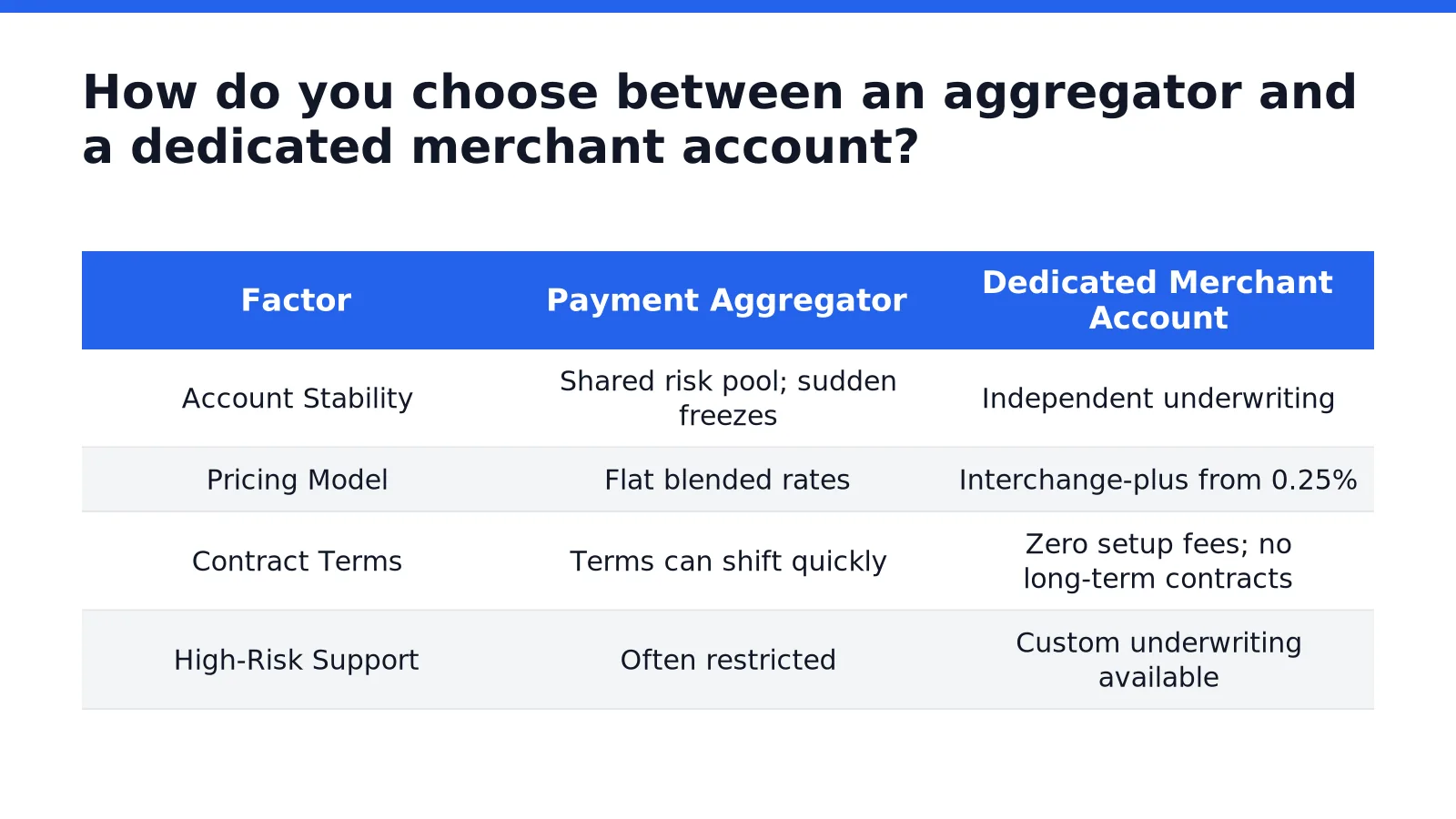
How do you choose between an aggregator and a dedicated merchant account?
The choice between a payment aggregator and a dedicated merchant account determines processing stability and long-term cost structure. Merchants evaluating woocommerce credit card processing face two fundamentally different infrastructure models. One pools merchants into a shared account. The other assigns a unique merchant identification number to a single business. Selecting the wrong model disrupts cash flow and increases per-transaction costs.
What makes aggregators risky for WooCommerce stores?
Aggregators simplify onboarding by grouping sellers under a master merchant account. This approach creates downstream problems for growing online stores. Account freezes occur without warning when transaction patterns trigger automated risk flags. High-volume merchants lose days of revenue while disputes sit in review queues. Charge.com offers a dedicated alternative that avoids shared-risk exposure. A dedicated merchant account gives each business independent underwriting and direct processor relationships.
Why does underwriting matter for high-risk WooCommerce sites?
WooPayments does not accept high-risk merchant accounts. Paycompass confirms this limitation excludes entire industry verticals from native WooCommerce processing. High-risk merchants need a third-party woocommerce payment gateway to accept credit card payments securely. Secureglobalpay.net reinforces this requirement. Dedicated underwriting evaluates business models individually rather than applying blanket rejections.
Credit card processing for woocommerce through Charge.com follows a transparent pricing framework:
How does pricing differ between the two models?
Aggregators charge flat blended rates that obscure interchange costs. Dedicated accounts use interchange-plus pricing with visibility into every fee component. Charge.com structures wordpress credit card processing rates starting at 0.25% above interchange. Zero setup fees and zero cancellation penalties eliminate the lock-in that aggregators impose. No long-term contracts bind the merchant to unfavorable terms. These terms give WooCommerce store owners processing autonomy without sacrificing rate transparency.

What are the steps to install a WooCommerce payment gateway plugin?
Installing a WooCommerce payment gateway plugin transforms a WordPress site into a transactional storefront. The process connects the store to a merchant account through a back-end application. Without this integration, businesses forfeit every sale that reaches the checkout page.
A WooCommerce payment gateway functions as a digital point-of-sale system for online transactions. Merchants must first select a provider. Once a merchant account provider is chosen, a gateway plugin connects the back-end checkout to the external processor.
What prerequisites are needed before installing a payment gateway?
A fully operational WordPress site with WooCommerce installed and configured is mandatory. The store owner must hold an active merchant account with a processor like Charge.com. Charge.com delivers domestic US merchant credit card processing with PCI-DSS compliance and provides free virtual terminals alongside free mobile readers for iOS and Android.
How is the plugin installed and activated?
- Download the gateway plugin file from the provider or the WordPress repository.
- Navigate to Plugins > Add New in the WordPress admin dashboard.
- Click Upload Plugin and select the downloaded .zip file.
- Select Install Now and wait for WordPress to unpack the archive.
- Click Activate Plugin once the installation completes.
How are the gateway settings configured?
The gateway requires API credentials from the merchant account. These keys link the store to the processor’s online credit card processing infrastructure.
- Go to WooCommerce > Settings > Payments in the dashboard.
- Locate the newly installed gateway and toggle it to Enabled.
- Select Manage or Set Up to open the configuration screen.
- Enter the API keys, merchant ID, and account credentials exactly as provided.
- Configure transaction settings, including authorization mode and accepted card types.
- Save changes and run a test transaction in sandbox mode.
Charge.com offers 24/7/365 US-based technical support for gateway integration and troubleshooting. A failed configuration causes immediate revenue loss. Testing the live gateway with a small transaction confirms the credit card processing for WooCommerce operates correctly before store launch.
How do you configure the gateway for secure WordPress credit card processing?
Secure WordPress credit card processing requires a gateway configured for PCI-DSS compliance, fraud protection, and dedicated merchant underwriting. A properly configured WooCommerce payment gateway protects cardholder data and prevents chargeback losses.
What prerequisites must a merchant meet before configuring the gateway?
Merchants need a domestic US merchant account with PCI-DSS payment compliance. Charge.com provides dedicated US merchant underwriting to ensure compliance and account stability. The gateway must also support WooCommerce compatibility for seamless integration.
How does a merchant configure the gateway step by step?
- Select a WooCommerce payment gateway that offers strong fraud protection and chargeback management.
- Complete merchant underwriting through Charge.com to establish PCI-DSS compliant credit card processing for WooCommerce.
- Install the gateway plugin and connect the merchant account credentials.
- Enable fraud filters and chargeback monitoring within the gateway settings.
- Activate a cash discount program to offset processing costs.
What security features should the configuration include?
PCI-DSS payment compliance is required for all businesses accepting credit cards online. Charge.com delivers this compliance as a standard component of its woocommerce credit card processing service. Merchants should review PCI compliance requirements before finalizing gateway settings.
How does underwriting affect gateway security?
Dedicated US merchant underwriting verifies business legitimacy and reduces account instability. This process supports secure transaction routing and sustained gateway performance.
What common mistakes should you avoid during setup?
Setup errors in woocommerce credit card processing carry measurable revenue consequences. Baymard Institute research shows about 69.8% of shoppers abandon their carts, with payment issues causing 6 out of 10 of those abandonments. A misconfigured woocommerce payment gateway directly triggers this loss.
What happens when fraud protection is left at default settings?
Failing to configure fraud protection settings invites chargebacks and account termination. A credit card processing for woocommerce setup requires active fraud filters, not passive defaults. Charge.com provides PCI-DSS payment compliance for retail, mobile, B2B, and e-commerce businesses, reducing this exposure.
Which setup mistakes create the most lock-in risk?
Merchants often overlook contract terms during gateway selection. Charge.com charges zero cancellation fees and imposes no long-term contracts, eliminating lock-in penalties. A complete online credit card payment gateway setup addresses processor selection, secure checkout integration, fraud configuration, and transaction testing.
Avoid these four errors during wordpress credit card processing setup:
- Skipping fraud protection configuration before the first live transaction.
- Selecting a processor with cancellation fees or multi-year contracts.
- Neglecting to test transactions across desktop and mobile checkout flows.
- Ignoring cart abandonment data that signals payment friction.
FAQ
What prerequisites are needed for WooCommerce credit card processing?
A functioning WordPress installation with WooCommerce active, a dedicated merchant account issuing a unique merchant ID, and a PCI-DSS compliant processor like Charge.com.
Does WooCommerce require a separate payment gateway?
Yes. WordPress credit card processing operates through an integrated gateway plugin connecting the WooCommerce checkout to the merchant account, not through WordPress core.
How do dedicated merchant accounts differ from aggregators?
Dedicated accounts assign a unique merchant ID to a single business, avoiding shared-risk exposure and account freezes that aggregators cause when transaction patterns trigger automated risk flags.
Conclusion
Configuring a WooCommerce payment gateway requires a dedicated merchant account, a PCI-DSS compliant processor, and active fraud protection settings. Merchants who complete dedicated underwriting, install the gateway plugin, and test transactions across desktop and mobile checkout flows eliminate the primary causes of cart abandonment. This setup secures revenue by removing payment friction before the first live transaction.